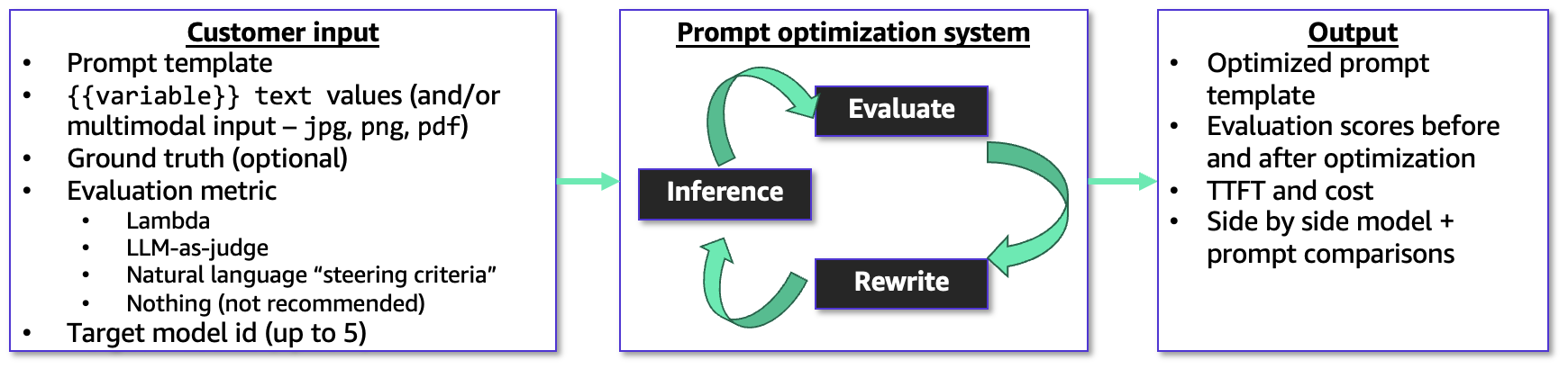
Amazon Bedrock has launched Advanced Prompt Optimization, a console tool that rewrites and evaluates prompt templates to improve performance and simplify model migration. The service uses metric — driven optimization with example user inputs and ground — truth answers, comparing original and optimized prompts across up to five inference models so teams can confirm improvements or spot regressions on known use cases. That capability lets builders measure performance and migration risk before switching models in production.
The optimizer accepts a prompt template plus example inputs and a chosen evaluation metric, and it can take optional guidance such as an AWS Lambda scoring function, an LLM-as-a-Judge rubric, or short natural — language steering criteria. It runs an evaluation — feedback loop that rewrites prompts to maximize the selected metric and returns both the original and final templates together with evaluation results, enabling teams to validate that changes actually improve the selected metric.
You can test optimization across up to five inference models simultaneously: select your current model as a baseline and up to four alternate models for migration testing, or run optimization against a single model to improve its performance. The console workflow begins by choosing Create prompt optimization on the Advanced Prompt Optimization page and selecting models and input data. optional fields include steeringCriteria, evaluationMetricLambdaArn, and customLLMJConfig. Each evaluationSamples entry contains inputVariables, referenceResponse, and inputVariablesMultimodal for multimodal inputs.
Multimodal optimization supports PNG, JPG, and PDF assets referenced by S3 URIs, so builders can optimize prompts for document and image analysis tasks. You can upload files directly in the console or import prompt templates from Amazon S3, and set an S3 output location where the service writes optimization results and evaluation data. Evaluation options provide flexibility: supply a Lambda function for concrete scoring (accuracy, F1, execution accuracy, or structured JSON matching), use LLM-as-a-Judge with a custom rubric, or rely on natural — language steering criteria. The optimizer returns evaluation scores as well as cost estimates and latency for results, helping teams measure trade — offs when migrating models or tuning prompts for production workloads.
Sources
Replies (0)
No replies in this topic yet.
