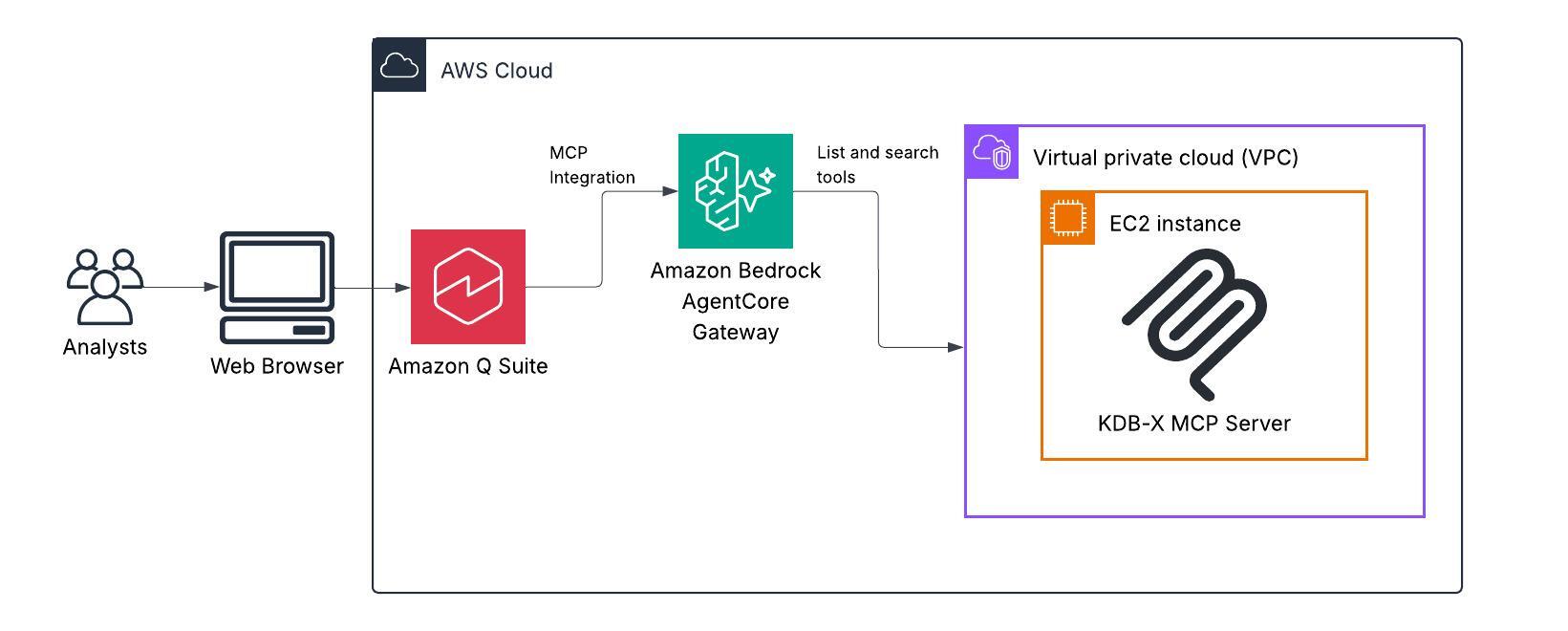
Amazon Quick can now be hooked to a KDB‑X MCP server running on an Amazon EC2 instance so users can ask conversational questions and get executable queries against kdb+ time‑series data — a demo in an AWS Machine Learning Blog walkthrough shows how. The integration matters because it turns natural‑language prompts into actionable analysis of high‑frequency market data without hand‑crafting low‑level queries. This change shortens the path from question to insight for analysts and engineers who work with large trade and market datasets.
Under the demo’s implementation, Quick converts natural language inputs into SQL that is forwarded to the KDB‑X MCP server for execution against kdb+ tables. The MCP server runs continuously on EC2 and exposes a domain‑specific Python toolset, including hybrid_search, run_sql_query, and similarity_search, so the translated queries and semantic searches operate directly on time‑series stores. Those Python functions extend Quick’s query and analysis capabilities through the MCP endpoint.
The setup places an Amazon Bedrock AgentCore Gateway in front of MCP targets as the authentication and routing layer. MCP servers are registered as targets in the gateway so agents can reach the MCP instance on EC2; inbound authorization on the AgentCore Gateway validates user requests before routing. Amazon Cognito is used in the walkthrough as the identity provider to satisfy the connector’s authentication requirement.
For financial analysts and other market‑data users, the result is a simplified workflow: ask questions in plain language instead of composing complex queries over millions of trades. The post highlights concrete capabilities available via the Quick chat interface, such as computing volatility metrics, querying market‑data ranges, and performing semantic searches of SEC filings stored in KDB‑X tables. These capabilities are surfaced as chat actions to speed routine analysis and decision making.
The walkthrough lists prerequisites and recommended resources for builders who want to reproduce the configuration. Required items include an AWS account, Amazon Quick with an Author Pro subscription, IAM permissions to create the necessary resources, basic familiarity with core AWS services, access to the KDB‑X public preview, and UV installed to run the KDB‑X MCP server. The post also recommends launching an EC2 instance sized t2.medium or larger for the MCP server.
Concrete deployment steps covered in the guide show developers how to clone the KDB‑X MCP server repository onto the EC2 instance, install KDB‑X, configure the MCP server to expose the Python‑based toolset, and register the MCP target with the AgentCore Gateway. Once registered, Quick appears to users as chat actions that invoke the gateway; authenticated requests are routed to the MCP server, where SQL and other tool calls execute against kdb+ tables to return results.
Sources
Replies (0)
No replies in this topic yet.
